
https://www.slab.org.uk/faqs/how-to-submit-online-claims-of-judicial-expenses/
https://www.slab.org.uk/faqs/how-to-submit-online-claims-of-judicial-expenses/

This guidance explains how to submit online claims where you are accepting judicial expenses and have not had a previous payment processed on our old accounts system.
To ensure the correct submission method is used you should enter the Legal Aid Reference Number (LARN) on the on-line account system. On doing so you will be advised on the submission method available to you.
Where you have not had a previous payment processed on our old accounts system you should submit your claim using the Legal Aid Online (LAOL) system. The process will follow the current civil process for submitting online accounts.
Firstly, you will need to complete and submit the civil synopsis, which will ask you to confirm that you are accepting judicial expenses.
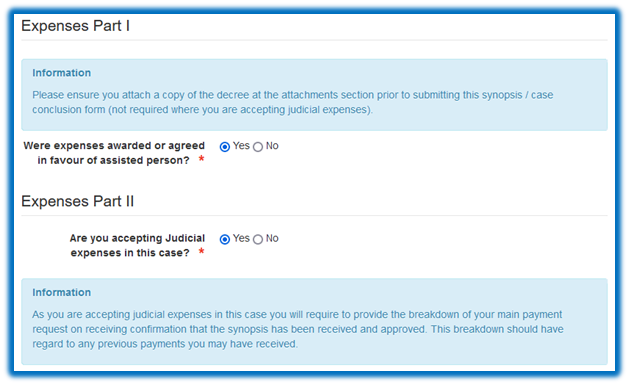
You will then be asked to confirm that you have submitted the judicial expenses to SLAB.
If you have not submitted the judicial expenses to SLAB you will receive the following message, which provides SLAB’s bank account details.
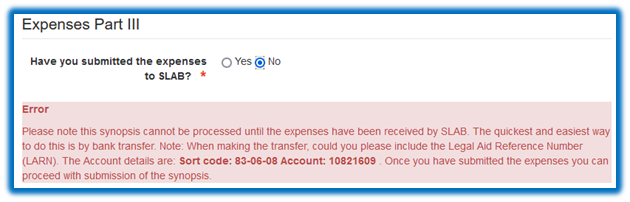
The preferred, and quickest method of submitting the judicial expenses recovered to SLAB is by bank transfer.
Once we have received the synopsis and checked the details provided and we have confirmed receipt of the expenses (including clearance of any sums submitted by cheque), the civil synopsis will be authorised and you will be notified of this.
Once you have received notification from us that the judicial expenses have cleared in SLAB’s bank account you will be able to complete the accounts synopsis.
You should answer ‘Yes’ to the question confirming you have submitted the judicial expenses.
You will be asked to insert the value of the judicial expenses recovered and the date the judicial expenses were submitted to SLAB.
You will then be asked to provide a breakdown of your claim.
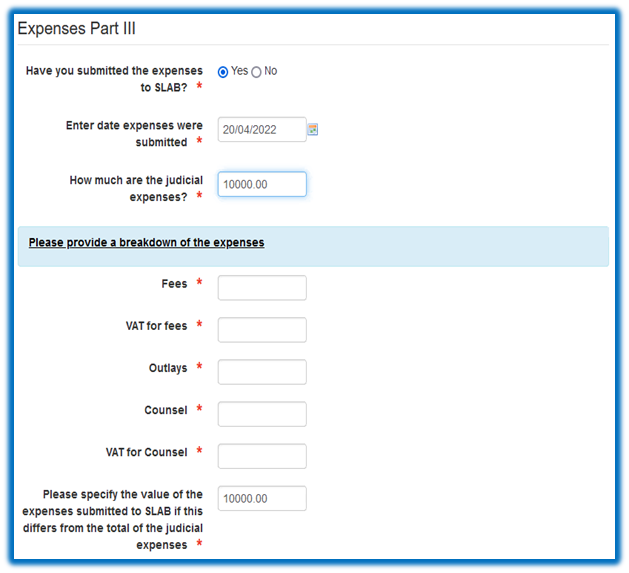
Once you have inserted the amounts you are claiming, you should insert details of any linked advice and assistance reference numbers on the synopsis form.
The synopsis should then be submitted to SLAB to review and approve.
When the synopsis has been approved, you should then select the ‘work breakdown’ tab.
The current on-line functionality will enable you to see any previous payments for the civil legal aid reference number (LARN).
You will be able to insert the amount you are claiming, which should be calculated after the deduction of all previous claims SLAB has paid on the case, including any payments that may have been made under a linked grant of advice and assistance.
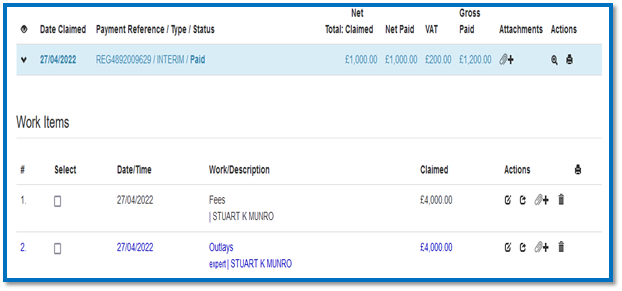
The payment request will be prioritised and we will notify you when this has been processed.
Should you require assistance with submitting your claim, please contact Lynne Dunlop, Accounts Systems Specialist, by email: dunloply@slab.org.uk