
https://www.slab.org.uk/faqs/how-you-can-check-the-answer-you-provided-or-the-automatic-update-to-asylum-cases-and-how-it-can-be-changed/
https://www.slab.org.uk/faqs/how-you-can-check-the-answer-you-provided-or-the-automatic-update-to-asylum-cases-and-how-it-can-be-changed/

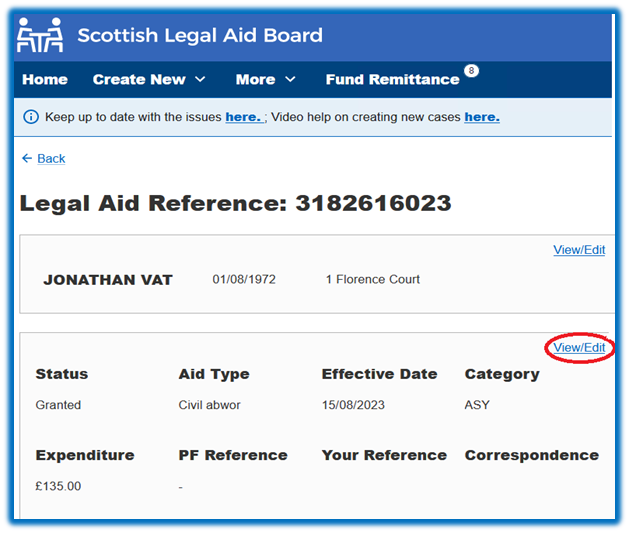
You can do this by accessing the view case function within Legal Aid Online (LAOL) and clicking on the view/edit function as shown in the screenshot:
This opens up the screen shown below where you can check the answer/update provided.
Please note it is currently not possible to edit the answer to this question – see further comments below.
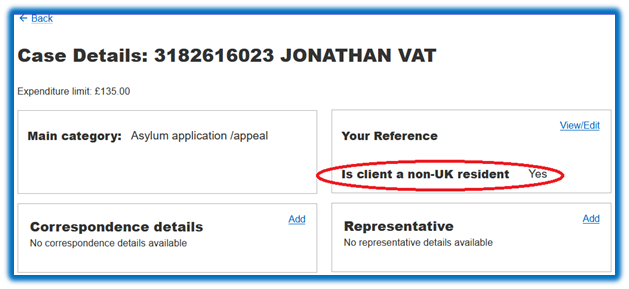
As you are currently unable to edit this it is imperative that you contact us prior to drafting and submitting your account. This will allow us to make the necessary change, where appropriate. You will then be able to proceed with drafting and submitting your claim.
Where you believe you have answered the question incorrectly please contact our Helpdesk directly.
Where you believe the automatic update applied is incorrect you should email immasylum.accounts@slab.org.uk or telephone 0131 560 2159, and a member of the Accounts team will be happy to assist.
We are in the process of developing an edit feature within the Applications system which will allow you to amend the answer, where necessary, and aim to have this released as soon as possible.